Having your divorce paperwork rejected by the court almost always means the filing has a procedural problem, not that your divorce has been refused. A missing signature, an outdated form, an unpaid or wrong fee, weak proof of service, a notary block left blank, or a name that does not match across forms can all stop the packet before a judge ever reads it.
If you are holding a rejection notice right now, do not start over. Read the notice word for word, fix the exact problem it names, and ask the court whether your original filing date still counts. That is usually faster and cheaper than refiling everything.
This guide explains what a divorce paperwork rejected notice really means, walks through the most common divorce filing mistakes behind rejected forms — including the uncontested divorce mistakes that catch cooperative couples — and gives you a pre-filing checklist and a recovery sequence to use before you resubmit.
New to the process? Start with what an uncontested divorce is and whether your case qualifies. For the full filing path, see the uncontested divorce process. If your spouse may not sign, compare uncontested vs. contested divorce before you refile.
TL;DR
A rejection is a procedural problem, not a refusal of your divorce. The clerk or e-filing system wouldn’t accept the packet — a judge never saw it. Fix the named flaw and resubmit.
- Rejected ≠ denied. Rejected means never filed. Returned for correction means the case exists and you’re curing a defect. Denied means a judge reviewed and refused — a decision on the merits. Read the notice to see which you got.
- Fix only what the notice names. Retyping the whole packet is how a second, different error slips in.
- Ask about your filing date immediately. Some courts treat a rejected submission as never filed; others let a corrected refiling relate back within a cure window. If a deadline, waiting period, or service clock is running, this is the first question for the clerk.
- Agreeing with your spouse doesn’t exempt you. Uncontested packets get bounced for missing signatures, outdated forms, unproven service, missing disclosures, wrong fees, and inconsistent names — the court reviews how you filed, not just whether you both consent.
- The clerk can answer procedure, not law. “Which page is missing a signature?” yes. “Is this settlement fair?” no.
- E-filing rejections are usually about the upload, not the divorce — wrong document category, wrong filing code, locked or oversized PDF, missing proposed order.
- Repeat rejections are almost always a consistency problem. You changed a support figure in the agreement but not in the worksheet, the proposed order, and the disclosure. Every document has to tell the same story.
- Build one master fact sheet — legal names, prior names, marriage and separation dates, children’s details, agreed terms — and fill every form from that single source.
- Get legal help if the rejection touches support, parenting, property, retirement division, a default judgment, or jurisdiction — or if you’ve been bounced twice and can’t see why.
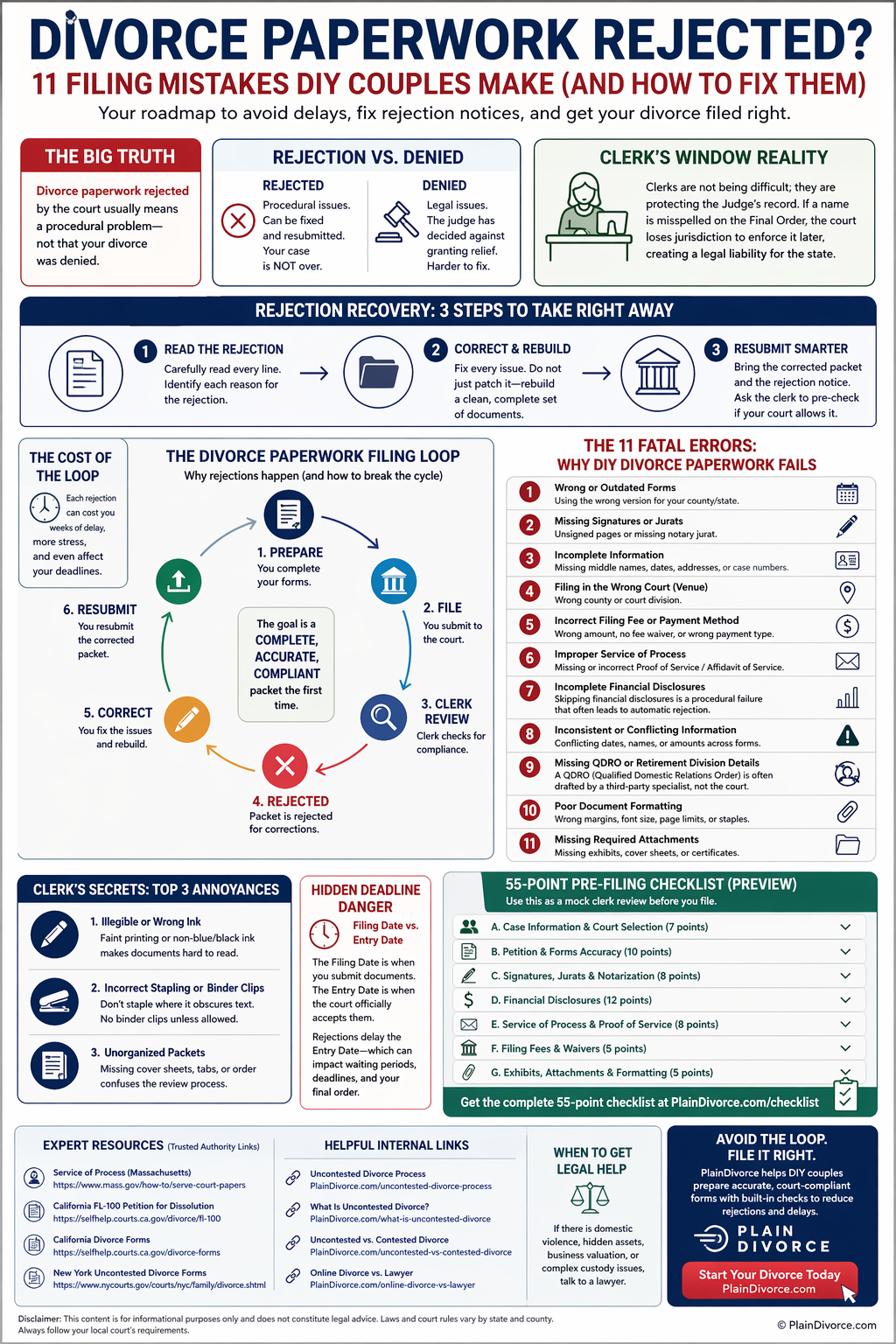
1. If Your Divorce Paperwork Was Just Rejected
Whether the clerk handed your packet back at the window or an e-filing came back rejected, work through this sequence before you change anything.
- Read the rejection notice word for word. It should name the exact reason: a missing signature, the wrong document type, an incorrect or unpaid fee, missing proof of service, an unreadable upload, an outdated form, an incomplete field, or the wrong filing code. Some courts must give you a reason in writing; others only tell you at the counter.
- Fix only what the notice names. The problem is often one form, one notary block, one blank field, or one document uploaded under the wrong category. Do not retype the whole packet unless the court tells you to — that is how a second, different error slips in.
- Ask what happened to your filing date. In some courts a rejected submission never counted as filed. In others, a corrected refiling relates back to the original date if you fix it within a set window. If a deadline, a waiting period, or a service clock is running, this answer matters.
- Keep the notice. It is your record of what was wrong, when it happened, and what you corrected. You may need it if the same issue comes up again.
A divorce paperwork rejected notice is frustrating, especially after a trip to the courthouse, but it is usually fixable when you correct the right thing in the right way.
2. Rejected, Returned, or Denied: What Each Word Means
These words describe different events, and the difference tells you how much trouble you are in.
- Rejected. The clerk or the e-filing system would not accept the submission. It was never filed. You correct the flaw and submit again. This is the most common outcome for a DIY packet and usually the easiest to fix.
- Filed but returned for correction. The court accepted the filing, then sent a document back because something needs to be fixed or added. The case exists; you are curing a defect.
- Stricken or continued. A judge removed a document from the record or pushed the case to a later date until a problem is resolved.
- Denied. A judge reviewed the request and refused to grant it — usually because a legal requirement was not met or the proposed judgment could not be approved. This is a decision on the merits, not an intake problem.
The exact terms and the sequence are set by your court’s rules, so read the actual notice rather than assuming. As one concrete example, California Rules of Court rule 2.259 requires that an electronic rejection notice state the reasons a document was rejected, and it treats confirmation that the court received a document as separate from confirmation that the document was filed. Other jurisdictions handle this differently.
In most DIY uncontested cases, a divorce paperwork rejected notice just means the case cannot move to the next step yet. The goal is not only to complete the forms. It is to submit a packet the court can accept, process, and approve.
3. How a Divorce Filing Moves From Submission to Final Order
People picture filing as a straight line. In practice a rejection creates a loop: submit, review, reject, correct, resubmit. Use this map to find where your case is stuck.
| Prepare | Choose the right forms for your jurisdiction and case type; fill them out from one consistent set of facts. |
| Submit | File at the window, by mail, or through the e-filing portal, with the fee or a fee-waiver request. |
| Intake review | A clerk or the e-filing system checks the packet for completeness, format, fees, and filing codes. |
| If accepted | The case gets a number and moves to service or a joint filing, then financial disclosure, then court review. |
| If rejected | Read the notice, fix the exact flaw, ask about the filing date, and resubmit. |
| Court review | A judge or court officer reviews the agreement, disclosures, any child terms, and the proposed judgment — on the papers or at a short hearing. |
| Final order | The judgment, decree, or divorce order is signed and entered. Any waiting period or separate registration step still applies. |
4. Talking to the Clerk: Procedural Questions Only
A court clerk can usually explain a procedural problem — which page is missing a signature, which attachment is not there, which document type an upload should use. A clerk cannot tell you what to ask the court for, whether your settlement is fair, or how to protect your rights. That line exists to keep the clerk from practicing law, not to slow you down.
When your filing is rejected, ask questions the clerk is allowed to answer:
- Which document is missing or being rejected?
- Is the problem the form version, a signature, a notary block, or an attachment?
- Does this need to be filed as a separate document or under a different filing code?
- Was the filing rejected outright, or filed and returned for correction?
- Can I swap the corrected page, or do I have to refile the whole packet?
- If I correct this quickly, can I keep my original filing date?
- Does the corrected page need a new notarization, or just a new signature and date?
Avoid legal-advice questions such as “Should I waive spousal support?” or “Is this parenting plan fair?” Those may need a lawyer. If you are weighing how much help you need, read our comparison of online divorce vs. lawyer vs. mediation.
Run a Mock Clerk Review Before You File
Before you spend time and money on the filing, review the packet the way an intake reviewer would. Check that every required form is present, every required signature and notary section is complete, names and roles match across forms, the fee is right, and any e-filed document is uploaded under the correct type. If a rejection ever mentions assembly, format, or names, treat it as a court-record problem to fix cleanly, not a minor complaint — an unclear record is hard to enforce later.
5. Common Divorce Filing Mistakes That Get Paperwork Rejected
These are the filing defects that most often show up in DIY uncontested divorce packets. They are categories to check, not a ranked list — your court’s rules decide which ones apply.
1. Missing Signatures, Initials, or Notarial Acts
A missing signature is one of the most frequent reasons divorce forms are rejected. Some forms need only the filing spouse’s signature, some need both spouses, and some need initials on every page. Others require a notarial act: a notary or commissioner verifies identity and either takes an acknowledgement (you confirm you signed) or administers a jurat (you swear or affirm the contents are true, then sign in front of the notary).
Why the court cares: signatures and notarization are the record that a real person reviewed, agreed to, or swore to the document. Without that, the filing may not be usable.
Pre-filing fix: search every page for “signature,” “signed,” “sworn,” “affirmed,” “subscribed,” “notary,” “commissioner,” “petitioner,” “respondent,” and “applicant.” Follow the exact certificate and execution instruction printed on the current version of each form; acknowledgement rules, jurat rules, and remote-notarization rules differ by jurisdiction.
2. Wrong or Outdated Form Version
Courts revise forms. An old PDF, a copy saved from a prior year, a form from the wrong county, or a packet from an unofficial site can all be rejected. Updated forms often carry new required notices, formatting, or statutory language, and an old version can leave out something the court now needs.
For example, California uses form FL-100, Petition—Marriage/Domestic Partnership (Family Law), effective January 1, 2020, to open a divorce, legal separation, or annulment. New York publishes a uniform uncontested divorce forms and instructions packet. Names, numbers, and revision dates like these change, so confirm the current version on your own court’s official forms list close to the day you file.
Pre-filing fix: download or re-verify each form within days of filing. Do not rely on a PDF saved months ago without checking it is still current.
3. Filing in the Wrong Court or County
Jurisdiction is a court’s legal power to hear the case. Venue is the correct location within that system — the right county, district, parish, or courthouse. Filing in the wrong place, or where neither spouse meets the residency rule, can stop a case before it starts.
Use the filing location your jurisdiction authorizes; do not infer it from a generic rule. “File where a spouse lives” is a common shorthand, but it is not universal. California, for instance, lets a couple who married in California but now live somewhere that will not dissolve their marriage file for divorce in the California county where they married — though that court may not be able to decide property, support, or parenting. California’s self-help divorce guide is one example of how residency and venue rules are spelled out state by state.
Pre-filing fix: confirm both the eligibility rule (residency or domicile, and any time requirement) and the specific court and county before you submit anything.
4. Service of Process Not Done or Not Proven
Service of process is the formal delivery of the court papers that tells the other spouse a case exists and what response is required. Depending on your jurisdiction and route, service may be required after you file, sometimes before, or not at all when you file a valid joint petition or your spouse signs a consent or waiver. A valid waiver and a default are separate paths, not a single exception you can generalize.
Massachusetts explains the basic idea well in its guide to service of process in the courts: the court needs a reliable record — a return of service, an affidavit of service, an acknowledgement, or a waiver — that the other party received proper notice or gave it up. If service is skipped, done by someone not allowed to serve, or never proven on the right form at the right stage, a divorce forms rejected notice often appears when you try to move the case forward.
Pre-filing fix: treat service as a required step with its own rules. Confirm what your court accepts for the uncontested, joint, waiver, and default paths, and note the response deadline that starts once service is complete.
5. Missing or Misfiled Financial Disclosures
Many courts require financial disclosure even in an uncontested case, and even when neither spouse wants support. Disclosure can cover income, expenses, property, debts, retirement accounts, bank accounts, tax information, and support calculations.
What trips people up is that the rules vary on four points: which documents are required, who receives them, when they are due, and whether they are filed with the court or only exchanged with the other spouse. In California, the preliminary declaration of disclosure is generally due within 60 days of filing the petition or response, is exchanged with your spouse and not filed with the court — only a proof of service is filed — and the second, final disclosure can be waived by written stipulation. New York labels several income and support worksheets “if needed.” Your court may do none of this the same way.
Pre-filing fix: if your case involves children, support, property, debts, or retirement accounts, assume extra financial forms may apply, and confirm the filing stage and any waiver rule before you submit.
6. Inconsistent Names, Dates, and Case Details
Courts compare forms against each other. A married name on one form and a maiden name on another, a middle initial that appears and disappears, two different marriage or separation dates, reversed petitioner and respondent roles, or a proposed judgment that does not match the agreement — any of these can get the packet rejected or returned. The final order has to identify the parties, the case, and the obligations clearly, or it is hard to enforce.
Pre-filing fix: build one master fact sheet — full legal names, prior names, dates of birth, marriage date, separation date, children’s full legal names and birth dates, addresses, and the agreed terms — and fill every form from that single source.
7. Wrong Filing Fee or Payment Method
Filing fees change, and payment rules vary by court. Common problems are an outdated amount, no fee at all, an incomplete fee-waiver request, e-filing surcharges left out, or the wrong county’s fee schedule. If payment is wrong or the waiver is incomplete, the court may not be able to open the case.
Pre-filing fix: confirm the current fee and the accepted payment methods on the official court or clerk website, and treat the fee as its own checklist item, not an afterthought.
8. Blank Fields and Unanswered Questions
A blank space is ambiguous. It might mean “not applicable,” but the court cannot tell whether the answer is “none,” “zero,” or an accidental omission. Some forms require “N/A,” “none,” “0,” or a checked box rather than white space.
Pre-filing fix: do a dedicated blank-field pass. For every empty field, decide whether it is allowed to be blank or should say “none,” “N/A,” “0,” or “see attached.”
9. The Agreement Does Not Match the Proposed Judgment
In an uncontested divorce, the settlement agreement may cover property, debts, parenting, child support, spousal support, insurance, and taxes. If your court also asks for a proposed final order, decree, or judgment, that document has to match the agreement. If the two conflict, the court may not know which terms it is being asked to approve.
Retirement accounts are a common mismatch point. Dividing an ERISA-covered private employer pension or 401(k) usually needs a separate Qualified Domestic Relations Order (QDRO) in addition to the decree. An IRA is generally divided as a “transfer incident to divorce” under the decree itself, and federal, state, and military retirement systems use their own order formats. The U.S. Department of Labor’s QDRO guidance explains that each plan must maintain written QDRO procedures and that the plan administrator, not the judge, decides whether an order qualifies. Get the specific plan’s written procedures before anyone drafts the order.
Pre-filing fix: lay the petition, the agreement, the financial and support forms, the parenting plan, and the proposed judgment side by side and reconcile every name, date, and dollar amount before filing.
10. Missing Children, Parenting, or Support Forms
Cases with minor children usually need extra paperwork, even when both parents agree. The court may require details on parenting time, decision-making, child support, health insurance, childcare costs, and the child-related tax questions, plus a support worksheet or calculation. A “no children” packet used for a case with children will be rejected.
Pre-filing fix: if you and your spouse have children together, confirm the full set of child-related forms for your jurisdiction before you assemble the packet.
11. Documents Filed in the Wrong Format or Order
Sometimes the forms are right but the submission is wrong. E-filing systems may require separate PDFs, specific document labels, searchable text, no password protection, a size limit, or a particular filing code. Paper filing can have its own local rules on copies, staples versus paperclips, exhibit tabs, cover sheets, original signatures, and even ink color. A correct form in the wrong filing category can still fail.
Pre-filing fix: read the filing instructions as a sequence — what is filed first, what is served, what comes back to the court later, and what format each piece has to be in. Treat payment method, assembly, copy count, upload categories, and signature rules as local-court checks, not a universal standard.
6. Filing Dates, Default, and Deadline Problems After a Rejection
A rejection can create a timing problem, not just a paperwork problem.
If the other spouse is served and does not respond within the deadline, the filing spouse can often ask for a default judgment — the court moves forward because the response window closed. But default is procedural. If the original petition, the summons, the service, the proof of service, or the default paperwork is defective, the court can reject the default request and make you redo the step.
Two dates often get confused. The filing date is generally when a document is submitted and accepted for filing. The entry date is when the court records an order or judgment. They are not always the same, and a waiting period or an appeal window may run from one and not the other.
Whether a corrected refiling keeps your original filing date is a local-rule question. Some courts allow relation back within a short cure window; others do not, and relief for a technical e-filing failure may specifically exclude an initial pleading. If your rejection notice mentions the filing date, a default, a missing summons, or proof of service, ask the clerk a procedural question or talk to a lawyer before you resubmit.
7. When Divorce Forms Are Rejected More Than Once
One rejection is often a single correction. A second or third usually means it is time to slow down and diagnose the packet rather than patch it again.
Ask whether the court is rejecting the same issue again, whether your last correction created a new mismatch, whether the packet is the wrong one for your case type, whether service is still incomplete, whether a financial or child-related form is missing, or whether the proposed judgment still conflicts with the agreement.
Repeat rejections are frequently a consistency problem: you change one detail — say, the monthly child support figure — in the agreement but forget to update it in the worksheet, the proposed order, and the financial disclosure. Every document your court requires has to tell the same story: the same names, the same dates, the same dollar amounts, and the same terms.
If the rejection touches support, parenting, property, retirement division, a default judgment, jurisdiction, or a right you might be giving up, get legal help before you refile. And remember, one uncontested divorce is not like another — a couple with no children and nothing to divide follows a shorter path than a couple splitting a house, debts, and child support. If you are not sure your case is really uncontested, revisit uncontested vs. contested divorce.
8. The 57-Point Pre-Filing Checklist
Use this as a mock intake review of your final, signed packet. It has 57 checks in six groups. Not every line applies to every case — skip the ones your court does not require, and treat the rest as a hard gate before you file.
Identity and case details (10)
- Full legal names match on every form
- Prior or maiden names are listed the same way everywhere
- Middle names or initials are consistent from page one through the proposed order
- Petitioner/applicant and respondent roles are not reversed between forms
- The marriage date is identical on every form
- The separation date is identical on every form that asks for one
- Children’s full legal names and birth dates match across forms
- Case type is correct, and the case number appears on every page once assigned
- The court and filing location match your jurisdiction’s venue rule
- The residency or eligibility section is complete and consistent
Forms and versions (8)
- Each form is the current official version for your court
- The correct packet is used for children vs. no children
- The correct packet is used for property or support issues vs. a simple case
- A local or family-law cover sheet is included if required
- A summons or its equivalent is included if required
- The petition, application, or complaint is included and complete
- The settlement agreement is included if your court requires or allows one
- The proposed judgment, decree, or order is included if required
Signatures and notarization (10)
- Every signature line for the filing spouse is signed and dated
- The other spouse’s signature is present where the form needs it
- Joint-petition signatures are present where that route is used
- Initials are added on every page or line that asks for them
- The notary or commissioner block is fully completed where required
- Forms that say sworn, affirmed, or subscribed were executed the way that form directs
- The notary stamp or seal is legible and the commission is not expired
- Witness signatures are included where the form requires them
- Signature dates are on or after the date the form allows
- The ink-color or original-signature rule is followed if your court has one
Service and notice (9)
- You know whether your route needs service, a waiver or consent, or a joint filing
- The correct documents were served, not just the petition
- The server is someone your court allows to serve
- The proof of service or affidavit of service is completed and signed
- A waiver, consent, or acknowledgement is completed if you are using that route
- The service date is recorded
- The service address matches the other spouse’s address on the other forms
- The proof of service is filed at the stage your court requires
- Any response or default deadline is on your calendar
Financial and child-related review (10)
- You have confirmed which financial disclosures your court requires
- You know whether disclosures are filed with the court or only exchanged
- Income figures are consistent across every form that asks
- Assets and debts are listed the same way on every form
- Support amounts are identical on the worksheet, the agreement, and the proposed order
- A child support worksheet or calculation is included if required
- Health-insurance and medical-expense terms are included if required
- Childcare and tax or dependency terms are included if your court asks
- The parenting schedule and decision-making terms are specific, not vague
- Any retirement plan that needs a separate order (a QDRO or a plan-specific order) is flagged
Filing package and format (10)
- The filing fee amount is confirmed on the official court or clerk site
- A fee-waiver request is complete and signed if you cannot pay
- The accepted payment method is confirmed
- The correct number of copies is included for a paper filing
- Exhibits and attachments are included and labeled
- Blank fields say none, N/A, or 0 where the form allows
- PDFs are legible, unlocked, and within any size limit for e-filing
- Each document is uploaded under the correct document type or filing code
- The packet is assembled in the order the local instructions give
- A complete copy is kept for your own records
If your divorce paperwork rejected notice came from e-filing, look hardest at the last group. The issue is often the upload category, the file format, a document label, or a missing proposed order rather than the divorce terms themselves.
9. Rejection Recovery: A Step-by-Step Reset
If you are holding a rejection notice, do not start over unless the court tells you to.
- Name the exact flaw. Is it a typo, a missing form, the wrong fee, missing proof of service, a bad notary block, or an incorrect e-filing upload? Match it to the wording of the notice.
- Call the clerk with a procedural question. Can you correct one page, swap a document, or add the missing attachment, or do you have to refile the whole packet? Is there a cure period?
- Protect your date if a clock is running. Ask directly: if you fix this by a specific day, do you keep your original filing date?
- Re-check consistency before resubmitting. Confirm every required document still tells the same story after your fix.
- Keep the notice and a full copy of what you filed. If the issue recurs, you will want the paper trail.
A rejection is rarely a disaster. A rushed correction, though, is the most common cause of a second one.
10. How a Guided Packet Process Reduces Filing Mistakes
DIY divorce should not mean guessing your way through civil procedure. PlainDivorce is a self-help service for uncontested divorce paperwork. It is not a law firm and does not give legal advice. For eligible couples who agree on the major issues, the aim of a guided process is to catch the common failure points before you print, sign, serve, or file.
A well-built packet process is designed to help you:
- start from the correct state, province, or territory path and the right case type
- enter your facts once and reuse them, so names and dates do not drift between forms
- see signature, notarization, and completeness checkpoints before printing
- get prompts for children, property, support, and service so the right forms are included
- work from a stage-ordered checklist: open the case, serve or waive service, complete disclosure, request review, finalize
Before you lose more time to a preventable correction, work from a structured process and your court’s own instructions. Start with the uncontested divorce process, then check your jurisdiction with a PlainDivorce kit for Texas, California, New York, or Ontario.
11. When to Get Legal Help
Self-help paperwork is not the right fit for every case. Consider talking to a family lawyer — often a single consultation or a document review, not full representation — if:
- you do not understand what rights you may be giving up
- your spouse has a lawyer, or there is pressure or coercion
- one spouse controls the money or the documents, or you suspect hidden assets or debts
- you own real estate or a business, or you need to divide a pension or 401(k)
- you disagree about parenting or support, or you are pursuing a default judgment
- your paperwork has been rejected more than once and you cannot see why
Depending on where you live, a lawyer may handle the whole case, review your agreement, or provide limited-scope help on one issue.
12. Divorce Paperwork Rejected FAQ
Does divorce paperwork rejected by the court mean my divorce was denied?
Usually not. A rejection means the clerk or the e-filing system could not accept the packet as submitted, so it was never filed. A denial is different: a judge reviewed the request and refused to grant it, usually because a legal requirement was not met or the proposed judgment could not be approved. Read your notice to see which one you received.
Why were my divorce forms rejected if my spouse and I agree?
Agreement does not remove the court’s filing rules. An uncontested packet can still be rejected for a missing signature, an outdated form, incomplete or unproven service, a missing financial disclosure, the wrong fee, inconsistent names or dates, or an upload in the wrong document category. The court reviews how the case is filed, not just whether you both consent.
Can I fix rejected divorce forms myself?
Often, yes, when the problem is procedural — a missing signature, a blank field, the wrong upload type, or a missing attachment. Correct exactly what the notice names, re-check that the rest of the packet still matches, and resubmit. If the rejection involves support, parenting, property, retirement division, a default, or jurisdiction, get legal advice before refiling.
Does a rejected filing change my filing date?
It can. In some courts a rejected submission never counted as filed, so your date is the day the corrected packet is accepted. In others, a corrected refiling relates back to the original date if you fix it within a set window. Relief for a technical e-filing failure may also exclude an initial pleading. Ask the clerk directly if a deadline or waiting period is running.
What is proof of service, and why does it get filings rejected?
Proof of service is the document that shows the court the other spouse received formal notice of the case. It may be called a return of service, an affidavit of service, or an acknowledgement of service. Filings stall when service was skipped, done by someone not allowed to serve, or never proven on the right form at the stage the court requires.
Do we have to file our financial disclosures with the court?
It depends on the jurisdiction. Some courts have you file the disclosures; others, such as California, have you exchange them with your spouse and file only a proof of service. Deadlines, required documents, and whether a disclosure can be waived also vary. Confirm your court’s rule before you assume disclosure can be skipped or filed.
What is a jurat, and how is it different from an acknowledgement?
A jurat is a notarial certificate showing you swore or affirmed that the contents are true and signed in front of the notary. An acknowledgement is the notary confirming you are the person who signed, without an oath. Some divorce forms require one, some the other, and remote-notarization rules differ by state, so follow the certificate printed on the current form.
How many times can divorce paperwork be rejected?
There is generally no fixed limit — you can keep correcting and resubmitting. But a second or third rejection is a signal to stop patching and diagnose the packet: check for a repeated issue, a new mismatch from your last fix, the wrong packet for your case type, or a proposed judgment that still conflicts with the agreement. Repeat rejections are a good reason to get a lawyer’s review.
13. Bottom Line
Most of the time, divorce paperwork rejected by the court comes down to details that feel small but carry the record: a missing signature, an outdated form, unproven service, the wrong court, a missing financial disclosure, a bad notary block, inconsistent names, or a document filed in the wrong format. Nearly all of it is preventable.
Before you file or refile, review the packet the way an intake reviewer will: form by form, signature by signature, date by date, attachment by attachment — and against your own court’s current instructions. If your divorce is uncontested and both spouses cooperate, a structured process plus a careful read of the local rules is usually enough to reach the final order without a stack of rejection notices.
PlainDivorce provides self-help divorce information and document kits. It is not a law firm, and this article is not legal advice. Court procedure, forms, fees, and rejection rules vary by state, province, and territory and change over time. For advice about your situation, consult a licensed family lawyer in your jurisdiction.
Sources and local rules can change. Use this guide as a plain-English organizer, then verify the current filing requirements with the official court or government source for your jurisdiction.

About Harry D
Expert contributor at PlainDivorce, helping Canadians and American navigate simple uncontested divorces with clarity and confidence.