How to File for Divorce Online: What Actually Works, by State and Province (2026)
To file for divorce online you submit your completed divorce forms through your court’s official electronic filing system (or an approved e-filing service provider), pay the filing fee or request a waiver, and wait for the clerk to accept the case. Online divorce filing is available in many U.S. states and Canadian provinces, but not all of them, and the rules change by county, case type, and whether you have a lawyer. Preparing forms online is a separate step from filing them.
In Canada? The process is run by each province and territory, not by a national portal. Skip to the Canada section or start with our desk divorce guide for Canada. Most of this article covers U.S. court e-filing.
TL;DR
Preparing forms online and filing them are two different events, and confusing them is the single most common mistake here. A finished questionnaire, a downloaded kit, and a printed packet all leave you with exactly zero filed cases.
- There is no national e-filing system, and availability turns on four separate questions: your state, your county, your case type, and whether self-represented filers are allowed to use the portal at all.
- California has no statewide public portal. Each superior court decides whether it accepts family law e-filing and approves its own electronic filing service providers — so “can I e-file in California” has 58 different answers.
- New York’s matrimonial e-filing is consensual, not default. It runs only in authorized counties, and an unrepresented litigant is never required to use it — participation is by opt-in through consent and registration.
- Illinois is the reverse: e-filing is mandatory statewide, but Rule 9 lets a self-represented litigant claim a good-cause exemption for no computer or internet, a disability, a language or literacy barrier, or a sensitive filing.
- Texas has an unusually forgiving rule. A document is deemed filed when it reaches your e-filing service provider, and the clerk may not refuse a non-conforming document — the clerk flags the error and gives you a deadline to fix it. Most other courts simply reject and make you file again.
- The PDF itself can sink the filing. Texas requires text-searchable PDFs at 8.5 × 11, correctly rotated, 300 DPI for scans, and never password protected. A phone photo saved as a PDF fails even when the form is filled out perfectly.
- Florida caps a trial court submission at 50 MB and requires ADA-compliant documents; oversize packets must be split into “Part 1 of 3,” “Part 2 of 3,” and so on.
- Picking the wrong filing code is a rejection. The petition, summons, fee waiver, proposed order, parenting plan, and proof of service can each need a different category selection.
- Online is not cheaper by default. Florida adds 3.5% on cards or a flat $5 for eCheck; a paid provider may add its own fee on top; and a fee waiver may cover court costs without touching portal or processing charges.
- Filing online does not shorten the divorce. It saves mailing and courthouse trips. It does not touch clerk review, service, statutory waiting periods, disclosures, or the judge’s review of the final packet.
- Service is still a separate step. A joint filing does not automatically create a service exception everywhere — commencement, service, and waiver rules are jurisdiction-specific.
- Three different events, in order: forms prepared → clerk accepts the filing → judge enters the final order. Only the third one divorces you, and in Canada a Divorce Act divorce ordinarily takes effect on the 31st day after that.
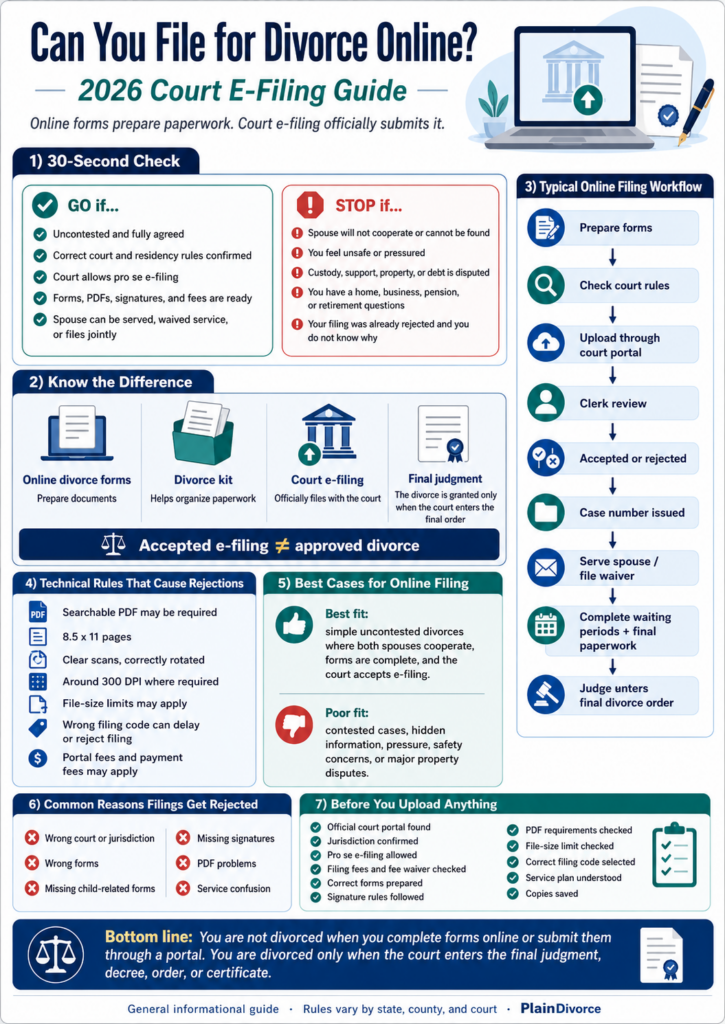
1. The 30-Second Online Divorce Filing Check
Before you pay for an online divorce service or upload anything to a court portal, run this quick test. It will not tell you whether your agreement is wise. It will tell you whether the filing path is likely ready.
GO: you can likely file for divorce online if
- Your divorce is uncontested — either you and your spouse have a signed agreement, you are filing a joint petition, or your spouse has been validly served and is not opposing the case.
- You know the correct court and you meet that court’s residency and jurisdiction rules.
- Your court lets self-represented (pro se) filers e-file divorce or family law documents.
- Your forms, signatures, PDFs, fees, and filing codes match that court’s local rules.
- You have a plan for service: your spouse will be served, has signed a waiver or acknowledgment your court accepts, or is a co-filer on a joint petition.
STOP: get help before filing if
- Your spouse will not cooperate, cannot be found, or disputes the terms.
- You feel pressured, unsafe, or controlled.
- You disagree about custody, parenting time, child support, property, debt, or spousal support.
- You own a home, a business, a pension, or a retirement account and you are not sure what you are entitled to.
- Your filing was already rejected and you do not understand why.
The option to file for divorce online is useful when the divorce itself is ready. It is not a shortcut around unresolved legal issues. If your case is simple and agreed, a PlainDivorce uncontested divorce kit can prepare your paperwork before you check whether your court accepts e-filing. Treat the court portal as a formal filing system, not as a document-preparation tool.
2. Online Divorce vs. E-Filing: The Difference That Prevents Mistakes
The phrase “online divorce” is used loosely by companies and courts. When people ask whether they can file for divorce online, they usually mean one of these things, and only some of them are actual court filings.
| What it is | What it does | Is the case filed? |
|---|---|---|
| Online divorce forms | You answer questions and receive completed paperwork | No — preparation only |
| Online divorce kit | A self-help packet for an uncontested divorce (petition, agreement, parenting plan, waiver, proposed judgment) | No — filing is a separate step |
| Court e-filing / court portal filing | You submit completed documents through the court’s official electronic filing system or an approved provider | Yes, if the court accepts it — a case number or docket number may issue |
| Emailing forms to the clerk | Sending PDFs by email | Only if the court’s official instructions say email filing is accepted |
| Online finalization | The court reviews an uncontested case on the documents, without an in-person hearing | Not a filing — a possible later step, and never guaranteed |
The takeaway: online divorce forms and kits prepare your paperwork. To e-file divorce papers, the court’s own portal has to accept and submit that paperwork to the court. A divorce is not filed because you finished an online questionnaire, downloaded a kit, or printed forms. Even when e-filing is available, the court may still require service, a waiting period, financial disclosures, affidavits, proposed orders, or a hearing.
3. Where an Online Divorce Filing Actually Starts
The most important point about how to file for divorce online is that e-filing sits near the beginning of the process, not the end.
Prepare forms online
        ↓
Check jurisdiction, signatures, PDFs, fees, and local court rules
        ↓
Submit through the court portal or an approved e-filing provider
        ↓
Clerk reviews the submission
        ↓
Accepted? —— No ——→ Fix the flagged item and resubmit
   ↓ Yes
Case number / docket number / stamped copies issued
        ↓
Serve the respondent, or file a waiver / acknowledgment / joint documents your court accepts
        ↓
Complete the waiting period, disclosures, parenting or support forms, and the final packet
        ↓
Judge or court official reviews the final documents
        ↓
Court enters the final divorce judgment, decree, or order
When exactly a filing counts as “filed” is set by each court. In Texas, for example, an electronically filed document is deemed filed when it is transmitted to your electronic filing service provider (with exceptions for weekends, holidays, and filings that need a motion and order), and the clerk may not refuse a document that fails to conform to the rules — the clerk instead identifies the error and gives you a deadline to resubmit, per Texas Rule of Civil Procedure 21. Other courts open the case only after the clerk accepts and dockets it. Read your court’s e-filing instructions for the rule that applies to you. You are not divorced until the court enters the final judgment, decree, or order required in your jurisdiction.
4. Online Divorce Filing by State and Province
There is no single national system, so online divorce filing by state has to be checked locally. Some states run a statewide e-filing system. Some leave rules to each county. Some require attorneys to e-file but let self-represented filers file on paper. Some accept family law e-filing but exclude specific divorce documents. The examples below are current as of 2026; always confirm with your own court.
California: check your superior court and its approved providers
California Courts self-help says divorce forms can be filed in person, by mail, or online “if your court allows it,” and that “not all courts offer e-filing” — each court sets its own rules and approves its own electronic filing service providers. There is no statewide court portal for the public. Before you rely on e-filing in California, check your county superior court’s website for whether it accepts family law e-filing, whether self-represented filers can use it, whether your document type is excluded, and which providers are approved. Fee waivers are requested on the court’s fee waiver form.
Texas: eFileTexas.gov
eFileTexas.gov is the official statewide e-filing system, and self-represented parties may use it (Texas Rule of Civil Procedure 21 makes e-filing available but not required for unrepresented filers in courts where it is not mandated). Before you e-file divorce papers in Texas, confirm whether your county accepts the filing, whether you are opening a new case or filing into an existing one, whether your PDF meets the state technology standards, what the credit-card or eCheck fee is at checkout, and whether a fee waiver or Statement of Inability to Afford Payment can be filed through the portal.
Florida: Florida Courts E-Filing Portal
The Florida Courts E-Filing Portal is the state’s official portal, and self-represented litigants can register. The Florida Courts website also publishes dissolution of marriage resources for the circuit court family division. Before you file for divorce online in Florida, confirm that you are filing in the circuit court family division, that your submission is under the portal’s 50 MB per-submission limit for trial courts, that your documents are ADA compliant as the Supreme Court requires, whether a separate notice of confidential information is needed, and what convenience fee applies (currently 3.5% of the filing fee for cards, $5 flat for eCheck).
New York: NYSCEF matrimonial e-filing is consensual
New York runs matrimonial e-filing through NYSCEF, but it is a consensual program available only in authorized counties, and 22 NYCRR 202.16-c provides that an unrepresented litigant is not required to e-file and may take part only through the consent and registration process. Before you count on filing online in New York, confirm that your county participates for matrimonial actions, that your case qualifies, whether you want to opt in as a self-represented filer, and whether the court requires county-specific matrimonial forms.
Illinois: eFileIL is statewide, with a self-represented exemption
eFileIL is a statewide system for attorneys and self-represented litigants, and e-filing of civil cases (which includes divorce) is mandatory under Illinois Supreme Court order. Illinois Supreme Court Rule 9 lets a self-represented litigant claim a good-cause exemption — for example no home computer or internet plus travel hardship, an ADA disability, a language or literacy barrier, or a sensitive filing such as an order of protection. Check the Active Courts list on the eFileIL site for your circuit’s status and whether local domestic relations forms are required.
Arizona: eFileAZ
The Superior Court eFiling Availability chart now shows Family cases as available to initiate and for later filings in every listed county through eFileAZ, and it may be used by litigants as well as attorneys. Before you file in Arizona, use the chart to confirm your county and case type, check whether your filing opens a new divorce case or belongs in an existing one, and see whether local cover sheets or family department forms are required.
Michigan: MiFILE / TrueFiling where available
Michigan’s system is branded MiFILE / TrueFiling and is rolling out toward all trial courts, but it is live in only a portion of them and domestic relations availability varies by court. Before you file online in Michigan, confirm that your specific court participates, that domestic relations filings are accepted there (some courts route family and Friend of the Court filings outside MiFILE), the required upload order, and how proof of service is handled.
Canada: province and territory filing
In Canada the Divorce Act is federal, but each province and territory runs the filing process and its own forms. Justice Canada explains that you file in a court in your province or territory using its forms, and that ordinarily you or your spouse must have lived in that province or territory for the full year immediately before applying. Ontario lets you apply for a simple or joint divorce online (through Family Submissions Online, or the Ontario Courts Public Portal for the Toronto region since October 2025). Use a province-specific guide rather than U.S. portal instructions — see our one-year separation guide for Canada.
5. Technical Standards That Can Break an Online Filing
Many guides stop at “upload your forms.” When you file for divorce online, the technical rules can matter as much as the form titles — and each rule below belongs to a specific court system, not to some national standard.
Two real examples. The Texas e-Filing Technology Standards require a text-searchable PDF, 8.5-by-11-inch pages, correct rotation, and a 300 DPI resolution for anything scanned (with OCR preferred); the file may not be password protected or encrypted. Separately, the Florida Courts E-Filing Portal FAQ caps a trial court submission at 50 MB total, requires ADA-compliant documents, and tells filers to split a larger document into “Part 1 of 3,” “Part 2 of 3,” and so on.
The searchable-PDF requirement (Texas standard)
Texas and some other courts want a searchable PDF, not a flat image scan. A blurry phone photo saved as a PDF can be flagged even when the form is filled out correctly. Check each document:
- Is it a PDF, and is the text searchable?
- Are the pages rotated correctly and sized 8.5 by 11 inches?
- Are any scans clear and around 300 DPI?
- Is the file unlocked, with no password or encryption?
Pro tip: a PDF created directly from Word, Google Docs, or Pages is usually already searchable; a photo scan usually is not. If your scanner has no OCR, use Acrobat, your word processor’s “Save as PDF,” or a reputable OCR converter before uploading.
File-size limits (Florida portal rule)
Large divorce packets can exceed portal limits, especially with high-resolution scans, settlement agreements, financial exhibits, and parenting plans. Florida’s portal caps a trial court submission at 50 MB and instructs filers to break an oversize document into numbered parts. General fixes:
- Scan in black and white unless color is required.
- Avoid unnecessarily high-resolution scans, and compress image-heavy PDFs.
- Keep exhibits, agreements, and forms as separate documents when the portal expects them separately.
Filing codes and document categories
E-filing portals ask you to choose a filing code, case category, or document type. A petition, summons, fee waiver, proposed order, parenting plan, proof of service, and final judgment may each need a different selection. The wrong code can delay routing or cause a rejection.
Payment and provider fees
The amount due online may bundle the court filing fee, county fees, summons or citation issuance fees, an e-filing provider fee, a card or eCheck convenience fee, and later service or certified-copy fees. That is why the checkout total can be higher than the base filing fee. Our divorce filing fees guide breaks the pieces down.
Accepted filing vs. approved divorce
A clerk may accept your filing because the document was submitted correctly. That is not a judge approving your terms. A settlement agreement can still be sent back later if it is incomplete, unclear, missing required child support terms or parenting provisions, or inconsistent with local rules.
6. How to E-File Divorce Papers, Step by Step
A typical process to e-file divorce papers looks like this. The exact order and requirements depend on your court.
- Confirm the correct court and that it has jurisdiction over your divorce.
- Prepare the required divorce forms for your location.
- Identify the petitioner and respondent (or the joint co-filers) correctly.
- Sign using the court’s accepted method. Some courts accept a typed “/s/ Name” signature for documents that are not sworn or notarized; sworn documents still need the oath and, where required, a notary.
- Save or scan each document in the required PDF format, and make PDFs searchable if the court requires it.
- Create an account on the official court portal or an approved provider platform.
- Choose the correct case category and filing code.
- Upload each document in the order the court specifies.
- Pay the filing fee or submit a fee waiver request.
- Wait for clerk review, then read the acceptance, rejection, or correction notice.
- Save the case number, docket number, and stamped copies.
- Serve the respondent or file the service-related documents your court accepts, if required.
- Complete waiting periods, disclosures, settlement terms, parenting paperwork, and final judgment forms.
- Wait for the court to enter the final judgment, decree, or order.
If a deadline is missed because of an e-filing provider outage, some courts (Texas among them) allow you to ask for relief or a reasonable extension. E-filing starts the court process; it does not finish the divorce.
7. Filing Fees, Portal Fees, and Fee Waivers
Filing online is not automatically cheaper than paper. You still pay the base court filing fee, and depending on the court, portal, and payment method you may also see an e-filing provider fee or a payment processing fee. Check these before you start the transaction:
- Whether the base filing fee shown is current for your county.
- Whether a card or eCheck convenience fee is added (for example, Florida charges 3.5% on cards and $5 for eCheck; Texas card fees are set by the payment processor and shown at checkout).
- Whether a paid electronic filing service provider adds its own fee.
- Whether a fee waiver covers only court fees or also portal and provider charges.
- Whether service, certified copies, or final judgment copies cost extra later.
If you cannot afford the fee, find your court’s official fee waiver, statement of inability, or indigency form before you begin e-filing. A waiver may reduce or remove court costs, but it may not remove every optional provider or payment processing charge.
8. Which Divorces Are the Best Fit for Online Filing
Online filing tends to work for uncontested cases — but “uncontested” covers more than one route:
- Agreed or joint: both spouses sign a settlement agreement, or file a joint petition, and agree on property, debt, support, and parenting.
- Default or non-response after valid service: your spouse is served and does not answer within the deadline, so the case can proceed without their participation under local law. California, for example, calls this a “default,” or a “default with agreement” when a signed agreement is folded into the judgment.
Courts label these cases differently — simple divorce, joint divorce, desk divorce, agreed divorce, dissolution, or uncontested dissolution — and the exact term depends on the jurisdiction. See our uncontested vs. contested divorce guide and, for Canada, the desk divorce guide. Online filing is a poor fit when the case is contested, one spouse will not disclose finances, or one spouse feels pressured to agree.
9. Documents You May Need to File for Divorce Online
The exact documents depend on your location, but an uncontested divorce packet often includes:
- Petition, complaint, application, or claim for divorce
- Summons or notice
- Joint petition or joint application, if both spouses file together
- Marital settlement agreement or separation agreement
- Parenting plan, if children are involved
- Child support worksheet or calculation
- Financial disclosure forms
- Fee waiver request, if needed
- Waiver of service or acknowledgment of service
- Proof of service
- Affidavit or sworn statement
- Proposed divorce judgment, decree, or order
- Vital statistics or record-of-divorce form, where the state uses one
Some courts require extra local forms. Some require notarization, sworn affidavits, or wet signatures; others accept electronic signatures. Our marital settlement agreement checklist and parenting plan guide cover the two documents that most often hold a case up. Check your court’s official instructions before you file.
10. Common Reasons Online Divorce Filings Get Rejected
A submission can be rejected even when the divorce is uncontested. The most common reasons:
- Wrong court or jurisdiction. Divorce is filed in the correct state, county, district, or judicial region, and residency rules apply.
- Wrong forms. Family law forms are local; a form from another state, county, or court may not be accepted.
- Missing child-related documents. With children, the court may require a parenting plan, child support worksheet, financial disclosures, or income and insurance information. See our child support in an uncontested divorce guide.
- Missing or misplaced signatures. Unsigned forms, signatures in the wrong place, one signature where two are required, or an electronic signature where the court does not allow one.
- PDF problems. Blurry, rotated, oversize, password-protected, missing pages, mislabeled, not searchable, or uploaded out of order.
- Wrong filing code. Choosing the wrong category can misroute the document or trigger a rejection.
- Service confusion. Filing and serving are separate steps. If service is required, the case may not move until proof of service, a waiver, an acknowledgment, or a consent document your court accepts is filed. See our how to serve divorce papers guide. Commencement, service, waiver, and joint-filing rules are jurisdiction-specific — a joint filing does not by itself create a service exception everywhere.
11. Online Filing Is Not Online Divorce Approval
Do not confuse these three events:
- You completed forms online: your paperwork was prepared.
- The court accepted your e-filing: your case or document was filed.
- The judge entered the final order: your divorce was granted.
You are divorced only when the court enters the final divorce judgment, decree, or order required in your jurisdiction — and finality has its own timing. Under the Canadian Divorce Act, section 12, a divorce ordinarily takes effect on the 31st day after the judgment; a certificate of divorce is issued afterward as proof, not as the order that grants it. Many U.S. states impose a waiting period between filing and the final judgment. Some uncontested cases finalize on the documents; others need a short hearing or an affidavit review. See our divorce waiting period guide and how long an uncontested divorce takes.
12. When to Get Legal Help Before Filing Online
Consider a family law attorney, a legal aid office, a courthouse self-help center, or a community legal clinic if you are unsure whether your agreement is fair, your spouse has a lawyer, you do not understand what rights you may be giving up, or your case involves children, a home, a business, pension division, significant debt, hidden assets, safety concerns, a missing spouse, or repeated filing rejections.
Legal help does not have to mean hiring a lawyer for the whole divorce. Many people use limited-scope (“unbundled”) help to review forms, explain their rights, or answer specific questions before they file for divorce online.
13. FAQ About Filing for Divorce Online
Can I file for divorce online in every state?
No. Online divorce filing depends on your state, county, and court, on your case type, and on whether self-represented filers are allowed to use the e-filing system. Some states run a statewide portal, some leave it to each county, and some accept family law e-filing but exclude certain divorce documents. Check your own court’s e-filing instructions before you assume you can file online.
Is online divorce the same as e-filing?
No. “Online divorce” usually means preparing your forms through an online questionnaire or kit. E-filing means submitting completed forms through an official court-approved electronic filing system. Preparing the paperwork does not file the case; a separate filing step does.
Can I use an online divorce kit and then e-file?
Often yes, if the documents match your court’s requirements and your court allows e-filing for your case type and filer type. You still follow the official filing rules: the correct forms, the right signature method, an acceptable PDF, the correct filing code, and the fee or a fee waiver.
Do I still need to serve my spouse if I file online?
Usually yes. E-filing starts the case; service is a separate requirement. In many cases the petitioner must serve the respondent unless the respondent signs a waiver or acknowledgment the court accepts, or unless both spouses file a joint petition. Commencement, service, and waiver rules are set by each jurisdiction, so use your court’s exact rule or form.
Does filing online make divorce faster?
It can cut mailing and courthouse trips, and some portals confirm receipt quickly. It does not remove clerk review, service rules, statutory waiting periods, required financial disclosures, or the judge’s review of the final documents. The overall timeline is still driven by your jurisdiction’s rules, not by the upload.
What happens if my online divorce filing is rejected?
The court or portal generally sends a notice explaining the problem. You may need to correct a form, re-upload a document, choose a different filing code, pay a fee, or file in a different court. In Texas the clerk cannot refuse a non-conforming document outright — the clerk flags the error and sets a deadline to resubmit. Other courts reject and ask you to file again.
Can my filing be accepted but my divorce still denied?
Yes. A clerk accepting the filing only means the document was submitted correctly. A judge can still require corrections, missing documents, clearer settlement terms, child support figures, parenting details, or a hearing before granting the divorce.
What is a docket number in an online divorce filing?
A docket number or case number is the tracking number the court assigns after it opens your case. You need it to file later documents, check the status, and communicate with the clerk. Save it, along with your stamped copies, as soon as it issues.
Am I divorced once I submit the forms online?
No. You are divorced only when the court enters the final judgment, decree, or order for your jurisdiction, and any waiting or appeal period has run. In Canada a Divorce Act divorce ordinarily takes effect on the 31st day after the judgment, and the divorce certificate is issued after that as proof.
14. Checklist Before You File for Divorce Online
Before you upload anything, run through this list.
- I found the official court or e-filing portal for my state and county.
- I confirmed the court has jurisdiction and I meet the residency rule.
- I confirmed that divorce or family law filings are accepted online for self-represented filers here.
- I know whether I am filing as the petitioner or as a joint co-filer, and how service will happen or be waived.
- I checked the filing fee, portal fee, card or eCheck fee, and the fee waiver process.
- I prepared the correct local court forms and signed them the way this court accepts.
- I checked whether my PDFs must be searchable, OCR’d, unlocked, or split by size.
- I confirmed the portal’s file-size limit and selected the correct case type and filing code.
- I understand that an accepted e-filing is not a final divorce.
- I saved copies of everything I submitted and I know what to do after the case number issues.
If your case is simple and uncontested, a PlainDivorce uncontested divorce kit can get your paperwork organized before you file — see our state guides for California and Texas. If your case involves conflict, pressure, children, major property, missing information, or repeated rejections, get legal help before you submit anything to the court.
PlainDivorce provides self-help divorce document preparation. It is not a law firm and does not provide legal advice, and this article is general information, not legal advice for your situation. E-filing availability, court forms, fees, signature and service rules, waiting periods, and the steps to finalize a divorce vary by court and change over time — confirm the current requirements with your court or a licensed attorney in your jurisdiction.
Sources and local rules can change. Use this guide as a plain-English organizer, then verify the current filing requirements with the official court or government source for your jurisdiction.

About Harry D
Expert contributor at PlainDivorce, helping Canadians and American navigate simple uncontested divorces with clarity and confidence.